The best hairstyle app for women is the one that reads your face shape and your hair before it suggests a cut. Glancely does that: it measures your face, reads your curl pattern, density, length and skin undertone, then renders the cuts and colors that fit on your own photo, from the side as well as the front. YouCam Makeup is the pick if color and makeup matter as much as the cut. Perfect365 suits you if you want the whole look at once. Gemini or ChatGPT can render a cut you can only describe in words.
Get Glancely on iOSMost lists of hairstyle apps for women are ranked by catalog size, as if the app with 500 bobs beats the one with 200. That isn't how anyone uses them. A woman about to cut eight inches off is asking whether her jaw and neck can carry it. One thinking about bangs is asking whether her forehead and her cowlick will cooperate. Someone going from dark brunette to copper is asking about her skin, not her hair. A big catalog doesn't answer any of those.
So this ranking starts from the decision, and then asks which app answers it best.
The Five Decisions, and What an App Has to Show You
Going short. A pixie or a chin-length bob puts your jawline, neck and ears on display, and it changes your profile more than your front view. The app has to keep your real face, not a smoothed version of it, and it has to show the side. A short cut that only looks good from the front is the most common haircut regret there is.
Adding bangs. Bangs shorten the forehead and pull attention to the eyes, which suits a long face and can overwhelm a short one. The app needs to know your face proportions, not just your shape, and it has to place the fringe where your hairline actually is. Whether your hair will lie flat or flip at a cowlick is still a question for your stylist.
A big color change. Copper, platinum and deep burgundy are decided by skin, not hair. A good app reads your undertone and depth and tells you which direction suits you before it shows you the shade. A tint dragged over a selfie under kitchen lighting will tell you very little.
Cutting curly or coily hair. Curls shrink, so length and layers behave differently than on straight hair, and a shape that works at 2A can turn into a triangle at 3C. The app has to read your curl pattern and density, otherwise it's recommending cuts for hair you don't have.
Growing it out. The hard part of growing out a bob or a pixie is the in-between months. An app that lets you render the stages (shaggy bob, lob, collarbone length) shows you which shapes to ask for on the way, so you don't spend a season hiding under clips.
1. Glancely — Best Overall
Full disclosure: we make Glancely. It ranks first because it's the one built around the read rather than the catalog. One selfie and your phone maps 76 facial landmarks and measures the proportions between them: face shape with a secondary blend, jawline, chin, and the balance of your facial thirds. The same photo gives a read of your hair, with curl pattern on the 1A–4C scale, density, strand thickness and length, and of your skin undertone and depth.
Only then does it recommend cuts and colors, each with a fit score and the reason it suits you. A butterfly cut gets recommended because your cheekbones are your widest point and the layers open there, not because it's trending. The women's catalog is as deep as the men's: bixies, mullet-pixies, French bobs and long shags, with colors like bronde balayage, auburn and burgundy alongside. Each recommendation renders on your own photo from the front, side and three-quarter view, which is the view that settles the going-short question. You can also bring a Pinterest or Instagram photo and see that exact cut on your face.
Best for: going short, adding bangs, and curly cuts, because all three depend on reading you first. Hair-type note: shoot your hair dry and in its natural state, not straightened for the photo, and the recommendations will fit the hair you'll actually be styling day to day. Skip it if you want to try fantasy looks for fun; a general image generator is quicker for that.
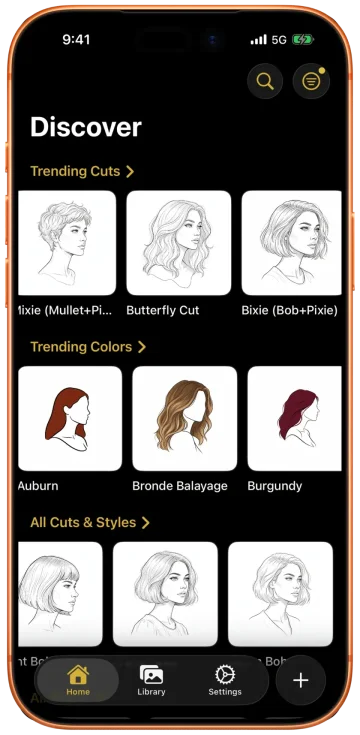
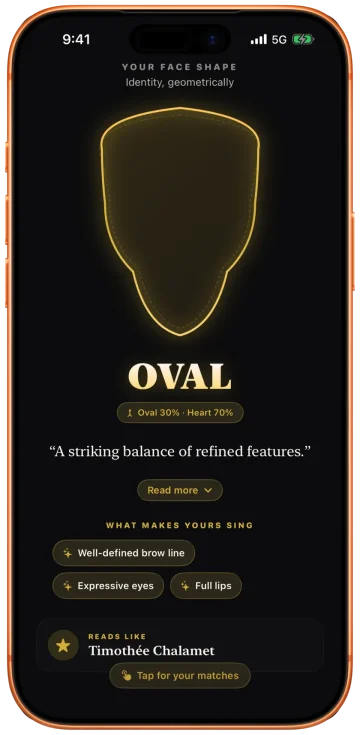
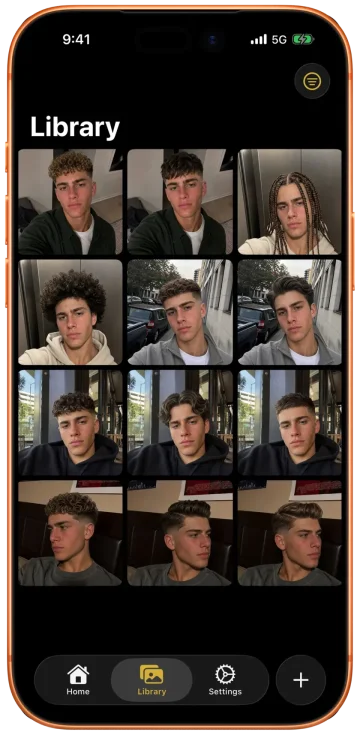
2. YouCam Makeup — Best for Color and Makeup Together
YouCam Makeup is a full beauty app with a hair section inside it: dozens of hairstyles and a long list of dye shades, which you can preview live on camera or on a photo. Its strength is putting hair color next to makeup, so you can see whether copper hair wants a warmer lip or whether going ash blonde means changing your brow color too. If a color change is the decision and you already think in terms of the whole face, it's a good place to play.
Best for: trying many shades quickly and seeing them with makeup. Hair-type note: the color preview recolors the hair you have, so on curly or coily hair the shine and the way the color sits in the curl won't match what dye actually does. Skip it if you need to know which shades suit your undertone; it shows you the color and leaves the judgement to you.
3. Perfect365 — Best for Trying a Whole Look
Perfect365 is a makeup-first app with a virtual hair changer for colors and styles, and thousands of one-tap looks that combine makeup and hair. If you're planning something with a dress code, like a wedding, a shoot or an event, and want to see the whole look at once, it's the quickest route to "hair up, red lip, does it work".
Best for: occasion styling and full-face looks. Hair-type note: the styles are laid over your photo as finished looks, so they show a mood rather than how your own texture will fall. Treat the result as a direction, not a preview. Skip it if the question is a permanent cut; it isn't built to read your face for one.
4. Gemini or ChatGPT — Best for a Cut You Can Only Describe
Sometimes the cut you want isn't in any catalog: "a grown-out bixie with curtain bangs, longer on the left". Upload a selfie to Gemini or ChatGPT, describe it, and it will render it. For odd, specific or in-between shapes, that range is unmatched. The prompt matters more than the tool, and our ChatGPT hairstyle prompts show how to describe a cut so your face stays your own.
Best for: growing-out stages and one-off cuts you can describe but not find. Hair-type note: both tools redraw the image, and they can quietly loosen tight curls or straighten waves. Ask them to keep your curl pattern exactly, and check that they did. Skip it if you need the result to look precisely like you; features drift a little with every edit.
Match the App to the Decision
Reach for Glancely when…
- You're going short and need to see the side view
- You want to know if bangs suit your face proportions
- Your hair is curly or coily and the cut has to work with it
- You want color directions chosen for your undertone
- You have a Pinterest photo and want it on your face
Reach for the others when…
- You want to swipe through dye shades with makeup — YouCam
- You're styling a whole look for an event — Perfect365
- The cut only exists in your head — Gemini or ChatGPT
What to Take to the Salon
An app preview is only useful if it survives the trip to the chair. Take these, and your stylist has what they need.
- Front and side, not just front. Screenshot the three-quarter view too. Stylists cut the back and sides from what they can see, and a front view hides both.
- Length against your body, not in inches. "Just grazing the collarbone" or "at the corner of my jaw" is clearer than "take off four inches", which depends on where you measure from.
- The words for the shape. Blunt or textured ends, long or short layers, face-framing or not, curtain bangs or a full fringe. Two sentences beat ten photos.
- For color, the direction and the depth. "Warmer and one shade lighter" or "cool, dark, no red" tells a colorist more than the shade name an app gave it.
- For curls, your pattern and how you wear it. Mention whether you diffuse, air-dry or straighten, so the cut is shaped for the hair you'll actually be wearing.
- One photo of what you don't want. It's the fastest way to rule things out.
Questions People Ask
What is the best hairstyle app for women?
Glancely, for a real cut or color decision. It reads your face shape, curl pattern, density, length and skin undertone before it recommends anything, explains why each cut suits you, and renders it on your own photo from the front, side and three-quarter view. YouCam Makeup is the better playground for dye shades with makeup, Perfect365 for full event looks, and Gemini or ChatGPT for cuts you can only describe.
Which app finds a hairstyle for my face shape as a woman?
Use one that measures your face rather than asking you to pick a shape. Glancely maps 76 landmarks on a selfie, returns your face shape with a secondary blend, and ranks women's cuts for it. A heart shape leaning oval gets chin-length volume, and a long face gets bangs and width at the sides. It checks those picks against your hair type too, so the shortlist fits your hair as well as your face.
Is there an app to see hairstyles on my face for women?
Yes. Glancely renders women's cuts and colors on your own photo, from more than one angle, after reading your face and hair. YouCam Makeup and Perfect365 overlay styles and shades on a selfie or live camera, and Gemini or ChatGPT will edit a described cut onto your photo. For a decision you'll act on, choose the one that keeps your real face and shows the side.
Can an app show me what I'd look like with bangs?
It can show you the shape on your face, which is most of the decision: whether the fringe shortens your forehead in a flattering way and where it lands against your eyes and brows. What no app can see is how your hair grows at the hairline. A cowlick or a strong part can make bangs flip. Show your stylist the preview and ask them to check your hairline before cutting.
Will a hairstyle app work with curly hair?
Only if it reads your curls. An app that knows your curl pattern and density can recommend cuts that account for shrinkage and for where volume will build. One that doesn't will suggest straight-hair shapes. Glancely reads curl pattern on the 1A–4C scale from your photo. Whatever you use, upload your hair in its natural state so the read matches how you'll wear it.
What's the best app to try hair color for women?
For choosing a color, an app that reads your undertone first. Glancely reads undertone and depth and points you at directions that suit you, warm copper or cool ash, before you try a shade. For swiping through many shades quickly, especially alongside makeup, YouCam Makeup's color library is the bigger playground. Our guide to changing hair color in a photo compares them in detail.
Bottom Line
The best hairstyle app for women depends on what you're about to do to your hair. For a cut or color you'll live with for months, start with the app that reads your face, hair and skin first and shows you the result from the side. For play, color swatches and occasion looks, the others are good at their jobs. Either way, walk into the salon with the side view and the words, not just a screenshot. For more on cuts by shape, see women's hairstyles.
See It From the Side First
One selfie reads your face shape, curl pattern, density and undertone, then the cuts and colors that fit are rendered on you from every angle. Free to download on iOS.
Download Glancely