The best app to change hair color depends on whether you want a verdict or a filter. For a color you'll actually pay a colorist for, Glancely reads your skin undertone and current color first, then renders the shades that suit you onto your own hair from three angles. To swipe shades live on camera: YouCam Makeup. To paint a balayage by hand: Facetune. To preview going gray: PhotoDirector. For a free experiment where you name the shade: Gemini or ChatGPT.
Get Glancely on iOS"An app to change my hair color" sounds like one request, but it covers two. Half the people typing it want to see themselves blonde, any blonde, just to know what it looks like. The other half want to know which blonde, or whether blonde at all, and they're asking because a wrong color is the most expensive hair mistake you can make. It sits next to your face for months, and correcting it means another appointment and another bill.
Most hair color changer apps only serve the first group. They find the pixels where your hair is, tint them, and call it a preview. We ranked every app below on whether it can serve the second group, turning "change my hair color" into "this is the color that works on me", and on how well it handles the first.
All Seven at a Glance
| App | Best for | How it previews | Phones |
|---|---|---|---|
| Glancely | Choosing a color that suits your undertone | Rendered on your photo, three angles | iPhone |
| YouCam Makeup | Swiping shades fast | Live camera or photo | iPhone, Android |
| Facetune | Balayage, ombré, money pieces | Photo, recolor or paint by hand | iPhone, Android |
| Perfect365 | Color and makeup together | Live camera or photo | iPhone, Android |
| PhotoDirector | Previewing gray and silver | Photo, AI hair tool | iPhone, Android |
| FaceApp | A one-tap edit to share | Photo filter | iPhone, Android |
| Gemini / ChatGPT | Free, open-ended experiments | AI regenerates the photo | iPhone, Android, web |
How This Ranking Works
Every app was judged on one question: does it help you pick a color you'll be glad to see in the mirror four months from now? That breaks into four tests, and they'll still be useful after the app store reshuffles.
Does it read you, or just recolor you? Choosing a hair color is mostly a question about your skin. Undertone decides whether a blonde brightens you or washes you out, and tone depth decides how many levels you can move before the color overpowers your face. An app that measures those before recommending anything is doing real work. An app that hands you a hue slider is showing you colors, not answers.
Rendered or tinted? A tint pushes a hue over the hair that's already in the photo, so it can darken convincingly but struggles to lighten. A rendered result rebuilds the color while keeping your texture, density, and the way light falls through your hair. That's the difference between looking like yourself with new color and looking like you're wearing a colored sticker.
One angle or three? Color reads differently in profile. A shade that's right from the front can disappear or glare from the side, and dimensional color like balayage lives mostly at the sides and back. A straight-on result alone is a filter, not a preview.
Honest, transparent pricing. The app should say plainly what's free and what the subscription covers, not reveal it in a trial countdown after you've fallen for a shade. Every entry below states its model openly.
1. Glancely — Best Overall
Full disclosure: Glancely is our app. It still takes the top spot because it's the only app on this list that answers the question you're really asking. Before it shows you a single shade, the Glancely Analysis reads your skin undertone (warm, cool, neutral, or olive), your tone depth on a five-step scale from fair to deep, and your current hair color down to its color family and hex value. It shows the observations behind each read, then shortlists the color directions that agree with it, each with a fit score and the reasoning for it.
Then it renders. Each candidate goes onto your actual hair, so the result keeps your texture and the way light lands on it, and you see it from the front, side, and three-quarter view. That side view is where balayage and face-framing highlights either work or don't. Cut and color are separate decisions, so you can audition copper on the haircut you already have instead of getting a new haircut along with the new color. When you've picked, you have a set of images to show your colorist instead of a stranger's photo from Pinterest.
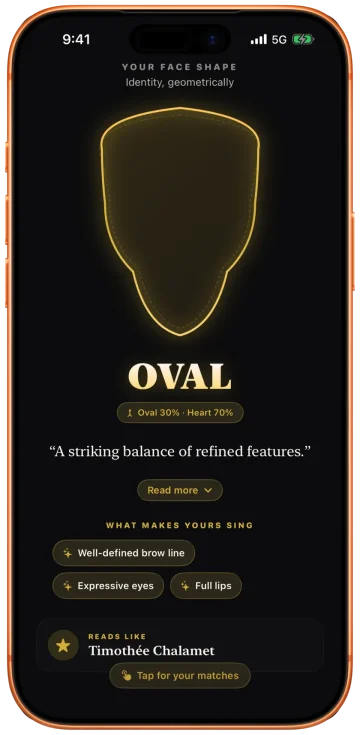
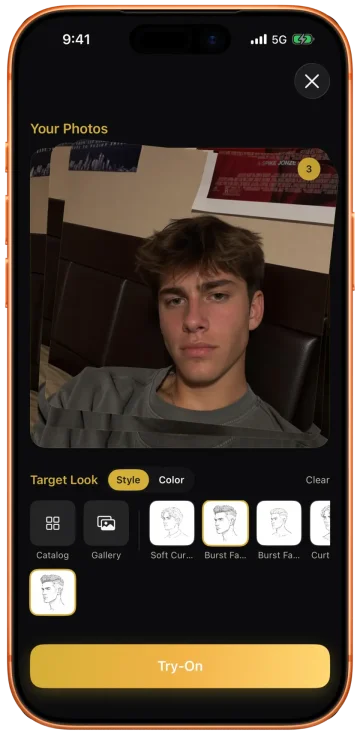
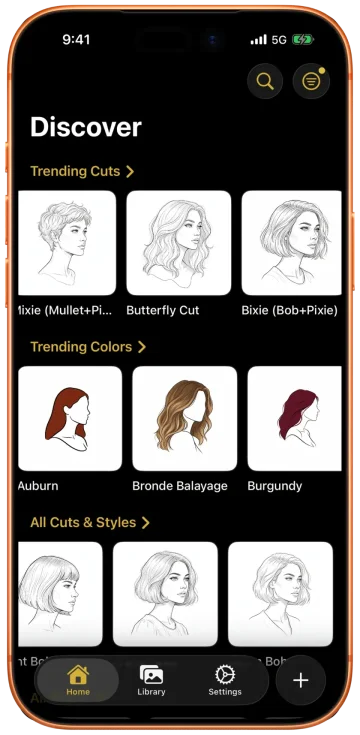
Pick it if an appointment is booked, the color is a real change (two or more levels, or a move between warm and cool), or you've had a color go wrong before and want to know why. Skip it if you only want endless zero-stakes recolors to laugh at; Gemini does that for free. Hair note: the read includes your curl pattern on the 1A–4C scale, and color is rendered onto your real texture, which matters because the same shade reads darker and richer on coils than on straight hair. Our app to change hair color page covers the full color workflow.
2. YouCam Makeup — Best for Live Color Swiping
YouCam Makeup is the fastest way to flick through color. Its hair color works both live on the camera and on an uploaded photo, with a library of more than 150 shades, so you can hold up your phone and slide from honey to copper to ash in a few seconds. For narrowing "warm or cool?" down to a family before you look closer, nothing on this list is quicker.
Pick it if you're at the early, playful stage and want to rule colors out fast. Skip it if you need to know which of the shades suits you: YouCam shows colors but doesn't measure your undertone, so the judging is left to you. It's a full beauty suite, so hair shares the screen with makeup, and the free tier caps hair color try-ons per day. Hair note: live tints are most convincing when you go darker or stay within a couple of levels. Very dark hair going light shows the tint's limits fastest.
3. Facetune — Best for Hand-Painted Balayage and Ombré
Facetune's hair tools split into two modes, and the second is the reason it's on this list. Recolor finds your hair automatically and changes it to one shade, which is fine. Paint lets you brush color onto specific sections by hand and layer more than one shade, which no other app here does as well. If you're picturing face-framing money pieces, a soft ombré, or a balayage that's heavier at the ends, you can build that placement yourself instead of hoping a preset matches.
Pick it if you already know the color family and want to work out placement. Skip it if you want the app to suggest the color: Facetune is an editor, not an advisor, and the result is only as good as your brushwork. It's also a retouching app first, so switch off any skin smoothing before you judge a color, or every shade will look better than it will in real life. Hair note: hand-painting is easiest on straight and wavy hair with clear edges. On tight curls, auto Recolor gives a cleaner result than the brush.
4. Perfect365 — Best for Color Plus Makeup
Perfect365 began as a virtual makeup app and still leads with it, but hair color is part of the same live preview, on your camera feed or a saved photo. That makes it the right pick when the hair color decision is tangled up with a look: a cool platinum that needs a different lip, or a red that changes which blush you'd wear. You can see the whole picture in one place.
Pick it if you want to judge hair color and makeup together. Skip it if hair color is your only question: the color is a tint over your existing hair rather than a rebuilt render, there's no undertone read, and the app's huge makeup library can bury the hair tools. Free to download with in-app purchases. Hair note: like other live tints, it handles shifts within your current depth best, such as warming up a brunette or deepening a red.
5. PhotoDirector — Best for Previewing Gray
CyberLink's PhotoDirector is a full photo editor with an AI hair tool inside it, and that tool includes several shades of gray along with blonde, chestnut and red. Gray is the color people most want to see before deciding, whether that's growing out their natural gray, blending it, or going silver on purpose, and most color apps treat it as an afterthought. PhotoDirector makes it a first-class option.
Pick it if you're weighing going gray or silver and want a quick, believable look at it. Skip it if you don't want a whole editing suite to find one feature, or you want guidance on which gray suits you. Cool silvers and warm pewters flatter very different skin. It's free to download with a premium tier, on iPhone and Android. Hair note: use a close-up, head-and-shoulders photo; CyberLink's own guidance is that full-length shots don't work with the hair color tool.
6. FaceApp — Best One-Tap Color Filter
FaceApp is still the quickest route from selfie to a shareable "what if". Pick a color, tap once, and get a polished result. For a group chat poll on "should I go platinum?", the speed is the point. It's the veteran of the category, on iPhone and Android, and it still owns that lane.
Pick it if you want a fun, fast edit to send to friends. Skip it if you're deciding: there's no undertone read and no multi-angle view, and its edits lean flattering, with smoother skin and brighter eyes, so every color looks good in a way that tells you little about the color itself. Its hair color tool works on photos rather than video. Hair note: filters tend to reshape and smooth the hair along with recoloring it, so curly and textured hair can come back looking straighter than it is.
7. Gemini and ChatGPT — Best Free Playground
Image-capable chatbots became hair color apps the moment photo editing went mainstream. Upload a selfie, type "make my hair copper with a darker root", and there you are, free, as many times as you like, in any shade you can describe. No other option comes close for range: rose gold, pastel lilac, a specific celebrity's balayage.
Pick it if you want free, unlimited experiments, or a shade no app catalog carries. Skip it if you need the result to be trustworthy: the AI regenerates the whole image, so your features drift and the result can be a flattering near-stranger. It gives one angle at a time with no consistency between them, and it will render a color that clashes with your undertone as happily as one that suits it, because it never measured you. Hair note: say "keep my haircut, curl pattern and length exactly the same" or it will often restyle you too. Our ChatGPT prompts for color analysis help you work out your undertone first, so you know which shades are worth asking for.
Going Lighter From Dark Hair: The Hardest Test
The single most common color question is some version of "would I suit blonde?" from someone with dark brown or black hair, and it's exactly where hair color apps split apart. A tint app multiplies a new hue onto pixels that are already dark, so the result comes out brassy, gray, or flat, like a color wash rather than lightened hair. If the preview looks muddy, that's usually the app, not the color.
Rendered results handle the jump far better because they rebuild the color rather than tinting what's there. Glancely and the AI chatbots both do this; Glancely keeps your real features and shows the side view, and the chatbots don't. Whichever you use, remember what the preview can't show: going from level 2 or 3 to a light blonde usually takes more than one salon session, and the in-between stage is warm orange. If the end result needs a toner to stay cool, the upkeep is part of the decision. A preview tells you whether the destination suits you; your colorist tells you the route.
The Rest of the Store: Tint Apps and Quiz Apps
Search "hair color changer" on any app store and most of the results fall into two groups, both easy to skip. Tint apps paint a flat color over your hair with hard edges and no sense of texture. If the screenshots look painted, the app is telling you what it is. Quiz apps don't change your photo at all; they ask you to pick a shade from a wheel and call it a match. Neither reads your skin, and neither shows the color on your own head from more than one angle.
Match the App to the Job
Reach for Glancely when…
- An appointment is booked and the color has to be right
- You want to know why a shade suits you, not just see it
- You need the side and three-quarter view before committing
- You're going lighter from dark hair and want a believable preview
- You want images to show your colorist
Reach for the others when…
- You're ruling out shades live, zero stakes: YouCam Makeup
- You're planning balayage placement by hand: Facetune
- You're matching color to a makeup look: Perfect365
- You're weighing going gray or silver: PhotoDirector
- You want a funny before-and-after: FaceApp
- You want free, unlimited experiments: Gemini or ChatGPT
Questions People Ask
What is the best app to change hair color in a photo?
For a color you're actually going to wear, Glancely: it reads your skin undertone, tone depth, and current hair color first, shortlists the directions that agree with that read, and renders each one onto your own hair from the front, side, and three-quarter view. For swiping through shades live on camera, YouCam Makeup. For painting a balayage or ombré by hand, Facetune. For a free experiment where you name the shade, Gemini or ChatGPT.
Is there a free app to change my hair color?
Yes. Glancely is free to download on iOS, and one photo gets you the color read the recommendations are built on. Gemini and ChatGPT will recolor a photo as many times as you ask at no charge, and YouCam Makeup gives a limited number of free hair color try-ons per day. Nearly every dedicated hair color app is free to download with a subscription for the full color library, so check what's included before you fall for a shade.
What's the best hair color changer app for Android?
YouCam Makeup, Facetune, Perfect365, PhotoDirector, and FaceApp all run on Android as well as iPhone, and Gemini is built into most Android phones. Pick by job: YouCam Makeup for live swiping, Facetune for painting multi-tone color by hand, PhotoDirector for previewing gray or silver, and Gemini for free open-ended experiments. Glancely, the undertone-matched pick, is on iPhone.
What app changes your hair color the most realistically?
One that renders the color into your hair rather than laying a tint over it. Tinting multiplies a hue onto the pixels that are already there, which is why dark hair turned blonde in a tint app looks muddy or gray. Glancely renders the new color while keeping your texture, density, and the way light falls on your hair, and shows it from three angles. The quick test for any app: if the result only looks right head-on, it's a filter, not a preview.
Is there an app that changes hair color in a video?
For a live, moving preview, YouCam Makeup and Perfect365 both apply hair color to your camera feed in real time, so you can turn your head and watch the color move. Perfect Corp's companion app, YouCam Video, adds hair color to recorded selfie videos. FaceApp's hair color tool works on photos. For a decision rather than a clip, a rendered photo from several angles tells you more than a live tint does.
Is there an app that shows what I'd look like with gray hair?
Yes. PhotoDirector's AI hair tool includes several shades of gray, which makes it a quick way to preview growing out your natural gray or going silver on purpose. Which gray suits you comes down to undertone: cool undertones carry icy silver, warm ones look better in a softer pewter, and Glancely's read tells you which side of that line you're on before you commit.
Can an app change my hair color without changing my haircut?
Yes, and it's a good way to separate the serious color tools from the filters. Glancely treats cut and color as separate decisions, so a balayage goes onto the haircut you already have. Facetune's Recolor tool also keeps your hair shape and only changes the color. One-tap filter apps and AI chatbots often reshape the hair at the same time, which muddies what the preview is telling you about the color.
What is the best app to find the best hair color for me?
An app that starts with your skin undertone rather than a grid of shades. Undertone (warm, cool, neutral, or olive) decides whether a color flatters you, and tone depth sets how far you can move before the color starts to overpower your face. Glancely reads both from one photo, shows the observations behind the read, and gives each recommended color a fit score; our app to find your undertone page walks through the read in full.
Bottom Line
No single hair color app does every job. Most of this list exists to show you colors, and each one has a lane: swiping, painting, makeup, gray, a quick laugh, free experiments. Only one is built for the moment that costs real money and months if you get it wrong, which is choosing. Start there, with your undertone read and the shortlist that comes from it, and use the rest to play.
See the Color Before You Commit to It
One photo in. Glancely reads your undertone and current color, shows the observations behind the read, and renders the colors that suit you on your own hair from three angles. Free to download on iOS.
Download Glancely