The best hairstyle prompt names one specific change and locks everything else down. Upload a clean front-facing selfie, say the exact cut or color you want, then add: keep my face, skin tone, expression, lighting, and background exactly the same. That gets you a good sketch. It won't tell you whether the style suits you — ChatGPT has no read of your face shape or hair — so for a decision you'll live with for months, start from a tool that analyzes your face first.
Get Glancely on iOSAsk ChatGPT for a hairstyle and it will happily oblige. But the difference between a result you'd screenshot for your barber and one that looks like a stranger wearing your haircut comes down almost entirely to how you wrote the prompt. Most people write "give me a new hairstyle" and get exactly what that deserves — a redesign of their whole face.
This is a working library. Below are the prompts that consistently produce usable edits, organized by what you're actually trying to decide, plus the honest limits of asking a chatbot to preview a haircut at all. If you've mostly been using Gemini, the same anatomy applies — our Gemini prompts for hairstyles cover the tool-specific quirks, with a different set of examples.
The Anatomy of a Hairstyle Prompt
Every prompt that works has four parts, in this order. Skip one and you hand the model permission to improvise:
- The subject lock. Establish that this is a photo of you being edited, not a new image being generated. "Edit this photo of me."
- The one change. Name a single, specific style — not a direction, a name. "A low taper fade with a textured fringe," not "something shorter."
- The constraints. Spell out what must not move: face, features, skin tone, expression, lighting, background, pose. This is the sentence most people forget, and it's the one doing the heavy lifting.
- The output spec. If you want a specific framing or angle, say so. Otherwise the model picks its own, and it usually picks the most flattering, least-informative one.
"Edit this photo of me. Change my hairstyle to [a specific named cut]. Keep my face, facial features, skin tone, expression, lighting, and background exactly the same. Do not alter anything except the hair."
That template is the whole game. Everything below is a variation on it.
Copy-Paste Prompts by Goal
To try a specific new cut
Be visual about shape, not just length. "Shorter" gives the model nothing to hold onto; "a collarbone-length shag with a curtain fringe and visible layers" gives it a picture.
"Edit this photo of me. Give me a collarbone-length shag with a curtain fringe and choppy layers. Keep my face, hairline, skin tone, expression, and the background exactly the same. Change only my hair."
To preview a hair color
Isolate the color from the cut, or you won't know which change you're reacting to. And remember that the model will render any color you name without ever asking whether it flatters you. To work out which color to name first, run one of our color analysis prompts before this one.
"Edit this photo of me. Change only my hair color to a warm honey balayage. Keep the cut, my face, my skin tone, my eyebrows, and the lighting identical. Do not change anything but the color."
To see yourself with longer hair
Length prompts drift the most, because the model has to invent hair that isn't in the frame and often redraws the jaw and neck along the way. Audit the result closely.
"Edit this photo of me. Show my hair four inches longer with soft, face-framing layers. Keep my face, jawline, neck, skin tone, expression, and background exactly as they are. Add length and layers only."
For a men's haircut
Men's prompts need more precision, not less. Short sides expose the head shape, so the three things a barber asks about — how high the fade goes, how long the top stays, and which way the top is styled — each have to be named. Leave one out and the model fills it with a generic side part. Pick the prompt that matches the change you're weighing.
If your hair is curly or coily, or thinning at the crown or temples, say so: add "keep my natural curl pattern" or "keep my hair density and hairline exactly as they are." Image models default to thick, straight hair and a perfect hairline, and a fade previewed on hair you don't have tells you nothing about the fade on yours.
"Edit this photo of me. Change my hairstyle to a mid skin fade with a textured crop on top. Keep my face, beard, hairline, skin tone, and the background exactly the same. Change only the hair."
"Edit this photo of me. Grow my hair out to a chin-length flow, swept back off the forehead and tucked behind the ears. Keep my face, jawline, beard, hairline, skin tone, natural hair texture, and the background exactly the same. Add length only."
Growing out is the change most men want to see before committing, and the one the model handles worst. It has to invent hair that isn't in the frame, so check the jaw and neck against your original before you trust the result.
"Edit this photo of me. Give me a low taper with a short textured fringe, and trim my beard to a short boxed shape that fades into the sideburns. Keep my face, jawline, skin tone, and the background exactly the same. Change only the hair and the beard."
This is the one exception to one change per prompt. A fade and a beard meet at the sideburn, so when the blend between them is what you're deciding, preview them together.
For a women's haircut
Women's cuts change three things at once: length, layering, and whether there's a fringe. A prompt that names only the cut ("give me a bob") leaves the model to guess the other two, and it usually guesses a glossy salon blowout. Name the length against your face, the layers, and the fringe separately, and tell it to keep your natural texture. Pick the prompt that matches the change you're weighing.
If your hair is curly or coily, add "keep my exact curl pattern and volume; don't straighten or loosen it" to any of these. Image models drift toward straight, smooth hair unless told otherwise, and a cut previewed on hair you don't have tells you nothing about the cut on yours.
"Edit this photo of me. Change my hair to a chin-length bob, blunt at the ends, with a soft side part. Keep my face, jawline, neck, skin tone, natural hair texture and color, and the background exactly the same. Change only the hair length and shape."
"Edit this photo of me. Keep my hair long, just past the shoulders, and add long face-framing layers starting at the cheekbones. Keep my face, skin tone, hair color, natural wave or curl pattern, and the background exactly the same. Add layers only; don't change the length."
"Edit this photo of me. Add curtain bangs parted in the center, ending at my cheekbones, blended into my existing length. Keep my eyebrows visible, and keep my face, hairline position, skin tone, hair color, and the background exactly the same. Change only the front of the hair."
From a reference photo
Upload both images in the same message and tell the model which one is the target and which one is you. The adaptation note matters: ask it to respect your own texture rather than pasting on hair that couldn't grow on your head.
"The first photo is me; the second is the hairstyle I want. Give me the cut from the second photo, adapted to my own hair texture and density. Keep my face and background exactly the same as the first photo."
Not sure which cut to prompt?
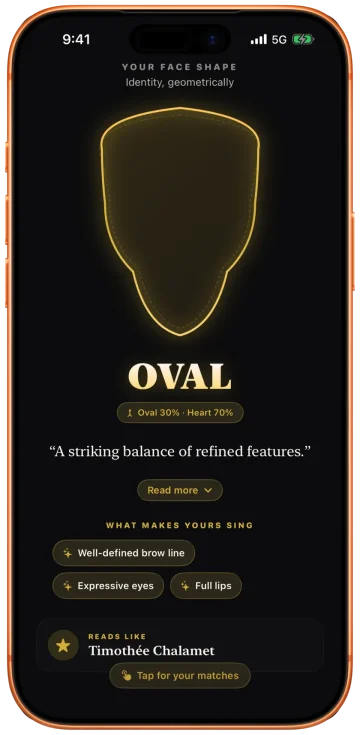
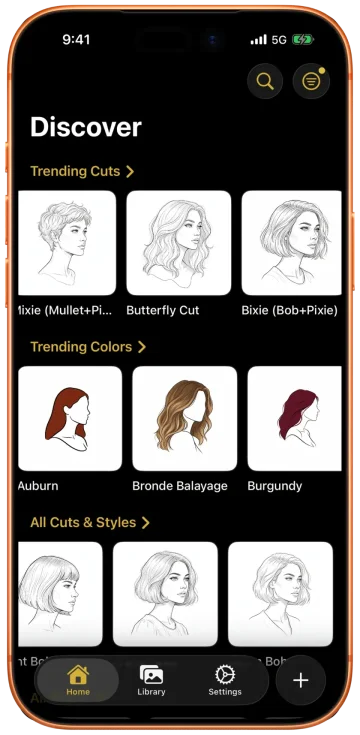
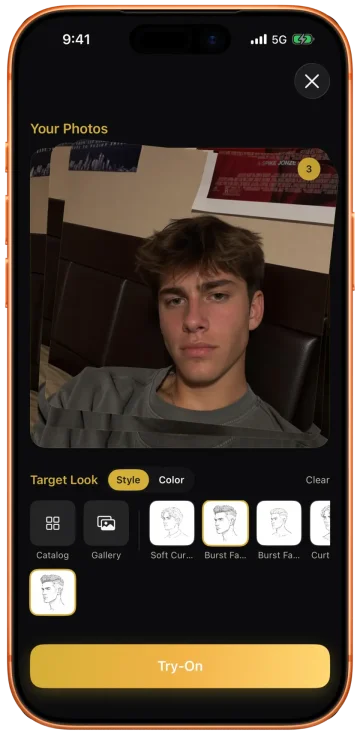
Every prompt above renders whatever you name, so the hard part is knowing what to name. Glancely answers that from one selfie: it measures your face shape, reads your hair type and skin undertone, and ranks the cuts and colors that fit you, with the reason for each. Paste the top pick into any prompt here, or skip the prompt and see it on your own face from every angle.
The Three Ways an AI Hairstyle Prompt Fails
Prompt skill fixes a lot, but three limitations are structural. They don't disappear no matter how well you write.
- It has no model of your face. It renders whatever you name, suitable or not — nothing in the process ever measured your face shape, hair density, or undertone. A vague or generic prompt can miss completely, and there's no real knowledge of you in the loop to catch the miss.
- It redraws more than the hair. The entire photo is regenerated from your words, so the jawline, nose, hairline, and skin finish drift along with the cut. You asked to change one thing and got a slightly different person.
- It gives you one angle. Ask for a side or three-quarter view and it invents a new head; there's no consistent, multi-angle look at the same result.
The biggest one is the first. Every prompt in this article assumes you already know which cut you want. The reason people search for a "prompt for hairstyle" in the first place is usually that they don't — they want something that looks right on them, and that's the one question a chatbot can't answer, because it never measured their face.
Where a Prompt Guesses, Glancely Measures
Think of ChatGPT as a sketchpad. It's excellent for the "what if I went platinum?" stage — fast, free, zero commitment, occasionally surprising. Use it to explore directions and cross things off the list. Just be clear about what it is: it never took a single measurement off your face, so every result is a guess dressed up as a preview.
A Generic Prompt (ChatGPT, Gemini)
- Never measures your face — it only reads your words
- Regenerates the whole photo, so non-hair details change too
- Renders whatever you name, flattering or not
- One style per image, one angle at a time
- Can miss entirely when the wording is vague
The Glancely Analysis
- Reads your face first, before it suggests anything
- Measures the geometry stylists work from — forehead, cheekbone, and jaw width, face length, jaw angle, thirds balance, symmetry
- Computes and ranks the cuts that fit that geometry, with the reasoning shown
- Changes only the hair, keeping your uploaded photo intact
- Renders the same result front, side, and three-quarter
Glancely begins at the camera, not the keyboard. On iPhone it maps 76 facial landmarks and turns them into the same set of measurements a stylist works from, then reads hair type, density, and skin undertone alongside them. From that profile it computes which cuts and colors actually fit — scoring and ranking them against your specific geometry instead of a vibe, and showing the reasoning behind every pick. That is a programmatic, mathematical match to your face, not a best guess. You can pull from a catalog of 1,000+ named styles, or upload the same reference photo you'd have pasted into ChatGPT.
The try-on that follows is closer to a fitting room than a filter. Your photo stays yours — Glancely changes the hair, not the person — and each finalist is rendered from front, side, and three-quarter so you can see how the cut lives at the angles other people actually see. When you've found the one, you walk in with a specific, named, measured ask.
And it doesn't stop at one image. The Glancely Analysis turns the same read into a plan — the cuts and colors that fit, the reasoning behind each, and the considerations that come with them — the kind of personalized roadmap people otherwise piece together by hand from a dozen looksmaxing guides and celebrity references. The difference is that this one is computed from your own measurements, not copied off someone else's face. A keyword prompt can't reproduce it, and a generic filter can't fake it.
That's the difference in one line: a generic prompt can miss because it never knew your face; a measured, personalized analysis starts from it — and that's Glancely.
Questions People Ask
What is the best ChatGPT prompt for a hairstyle?
Name one specific cut, then fence off everything else. A reliable template is: 'Change my hairstyle to [a specific named cut, e.g. a low taper fade with a textured fringe]. Keep my face, facial features, skin tone, expression, lighting, and background exactly the same. Change nothing except the hair.' The more precise the style name and the firmer the lock on your face, the more usable the result.
Can ChatGPT show me a haircut on my face?
Yes, but understand what it's doing: ChatGPT doesn't place a haircut onto your photo, it draws a new photo that's supposed to look like you with different hair. Because the whole image is regenerated, small things drift — the jawline, the nose, the hairline, the skin finish. Compare the output against your original before treating it as a preview of you.
What is a good AI prompt for a men's haircut?
Get specific about the fade height, the length on top, and the texture, because short sides leave nothing to hide behind. For example: 'Change my hairstyle to a mid skin fade with a textured crop on top. Keep my face, beard, skin tone, lighting, and background exactly the same.' Avoid vague terms like 'short on the sides' — name the fade and the top separately. For longer hair, name the length against your face ('chin-length, swept back'); to see a cut with a beard, ask for both in one prompt so the sideburn blend is drawn together.
What is a good ChatGPT prompt for a women's hairstyle?
Name the length, the layers, and the fringe separately, and tell it to keep your natural texture. For example: 'Edit this photo of me. Change my hair to a chin-length bob, blunt at the ends, with a soft side part. Keep my face, jawline, neck, skin tone, natural hair texture and color, and the background exactly the same.' For long hair, keep the length and ask for face-framing layers from the cheekbones; for curly hair, add 'keep my exact curl pattern and volume'.
Does ChatGPT know which hairstyle suits my face shape?
No. ChatGPT renders whatever you name, whether or not it flatters your face shape, hair texture, or skin undertone. It has no measured read of your proportions or your hair's density, so it can't rule a cut in or out for you — that judgment is exactly what the prompt leaves to you.
What is the best prompt for changing hair color?
Isolate the color and forbid everything else: 'Change only my hair color to a warm honey balayage, keeping the cut, my face, my skin tone, and the lighting identical.' Then check the result against your undertone — the same blonde sits very differently on a warm face than on a cool one, and the model won't tell you which way it went.
Can I use the same hairstyle prompts in Gemini or Midjourney?
Largely yes — the anatomy of a good prompt travels across tools. ChatGPT and Gemini both edit an uploaded photo and reward explicit 'keep this identical' language. Midjourney is built to generate images from text rather than edit a real face faithfully, so it's better for imagining a look than for previewing it on you. The failure modes are the same everywhere.
Bottom Line
The prompt that works is boring on purpose: one specific change, everything else locked. Use the library above, iterate one variable at a time, and audit every result against your real face before you trust it.
Then be honest about what a prompt can decide. It shows you the style; it can't tell you it's the right one, because it never learned your face to begin with. When you're past exploring and ready to choose, start from the face instead: a measured, mathematical read of what suits you, a programmatic match to the cuts that fit, and a try-on that keeps you you and shows every angle. Glancely does all of it, and it's free to download on iOS.
Skip the Prompt, Start From Your Face
Upload one selfie. Glancely measures your face first, computes the cuts that fit, and renders them on you — front, side, and three-quarter. Free on iOS.
Download Glancely