Yes. Gemini and ChatGPT will try hairstyles on your photo for free, as often as you like, and Glancely gives you your face shape and much of the read around it free with the download on iOS. Most dedicated try-on apps are free to download with a subscription for the full toolset, because every rendered hairstyle costs the app money. The best free setup uses two tools: Glancely to learn which cuts suit your face, and a Gemini prompt to preview them.
Get Your Face Shape on iOSType "free hairstyle app" into the App Store and nearly everything that comes back says free. Download three of them and you'll usually meet the same screen within a minute: a glowing button, a price in small type, and a trial that turns into a subscription next week. The word was true. It just described the download, not the thing you came for.
So this guide answers the question the way you'd want a friend to: what each app actually lets you do before you pay anything, which free option is good for which job, and how to string the free parts together into something that gets you to a haircut you'll be happy with. Glancely is our app, and it's on the list; we've been as plain about its free part as about everyone else's.
What "Free" Means in a Hairstyle App
Four different deals hide behind the same word. Knowing which one you're looking at saves you the download:
- Free, full stop. General chatbots with image editing — Gemini, ChatGPT — change your hair in a photo without a bill, within their daily limits. You pay in other ways: they don't know what suits you, and they redraw your face.
- Free to download, with a free core. The app gives you something genuinely useful for nothing, and charges for the rest. This is the deal worth looking for.
- Free to download, paid to use. The download costs nothing, but every feature you came for sits behind the subscription screen. Not dishonest, but not free in any sense you'd care about.
- Free trial. The full app for a few days, then an automatic charge unless you cancel. Fine if you're deciding this week; costly if you forget.
Why a Fully Free Try-On App Is So Rare
A filter that tints your hair can run on your phone for nothing. A try-on that draws a believable new haircut on your face can't: each image is generated by a large model on a server, and every one of them has a real cost to the company running it. An app that gave unlimited realistic try-ons away would pay for each one, so in practice the free version gets capped, watermarked, padded with ads, or offered by a company that earns its money somewhere else. That last group is why the chatbots can do it.
None of this makes paying necessary. It means the useful question isn't "which app is free?" but "which part of my decision can I get for free, and from whom?"
The Free Hairstyle Apps, by What You Want to Do
1. Glancely — free face shape and read, for finding what suits you
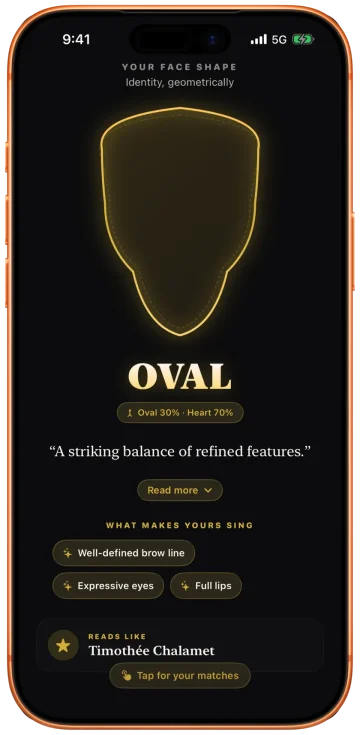
Use it for: the question underneath most hairstyle searches, which is what will actually suit my face. Take one selfie and Glancely maps 76 landmarks on your phone, measures the proportions of your face, and returns your face shape with any secondary blend. That result comes free with the download, together with much of the read around it, which is enough to know which families of cuts work for you before you've tried a single one on. The full analysis goes further, into your hair's curl pattern on the 1A–4C scale, its density, and your skin's undertone, and Glancely Premium opens up the rest.
Skip it if: you're on Android — it's iOS only for now — or you just want to play with wild looks for fun, which the next entry does better.
Hair-type note: it reads your curl pattern and density rather than assuming straight hair, so the cut families it points to account for whether your hair can hold them.
2. Gemini or ChatGPT — free, unlimited experiments
Use it for: trying anything you can describe, as many times as you like, without paying. Upload a selfie, name a cut, and tell it to keep your face the same. For range and price it's unbeatable, and a well-written prompt gets a surprisingly realistic result — our Gemini prompts for hairstyles and ChatGPT prompts for hairstyles have tested wording to copy.
Skip it if: you need it to tell you what suits you. It renders whatever you name, and because it regenerates the whole photo, your jaw, nose, and hairline can quietly change between versions.
Hair-type note: image models drift toward straight, smooth, thick hair. If yours is curly, coily, or thinning, say so in every prompt, or you'll be previewing a cut on hair you don't have.
3. YouCam Makeup — live hair color on camera
Use it for: flicking through hair colors live on your front camera, which is the fastest way to rule out a shade. It's free to download, with in-app purchases for the fuller catalog.
Skip it if: you want a new cut rather than a new color. Its strength is recoloring the hair you already have, inside a much bigger makeup app.
Hair-type note: live color reads best on smoother hair; on tight curls and coils the overlay can look painted on, so judge the shade, not the texture.
4. FaceApp — one-tap hair filters to share
Use it for: quick, funny "what if" edits to send to friends. It's free to download, with in-app purchases for more filters.
Skip it if: you're making a real decision. Its hair filters swap in a template look rather than a named cut you could ask a barber for, and they're built to flatter.
Hair-type note: the templates replace your texture rather than working with it, so the result says little about how a style would sit on your own hair.
A Free Way to Try Haircuts on Your Face, Start to Finish
No single free app covers the whole decision, but two of them together come close. This is the route we'd give a friend who doesn't want to spend anything:
Get Your Face Shape Measured
Download Glancely and take one front-facing selfie in daylight with your hair off your forehead. Note your primary shape, any secondary blend, and the read around it — and add what you know about your own hair, because curl pattern and density matter as much as the shape. The know your face shape page explains the six shapes if you want the background.
Shortlist Three Named Cuts
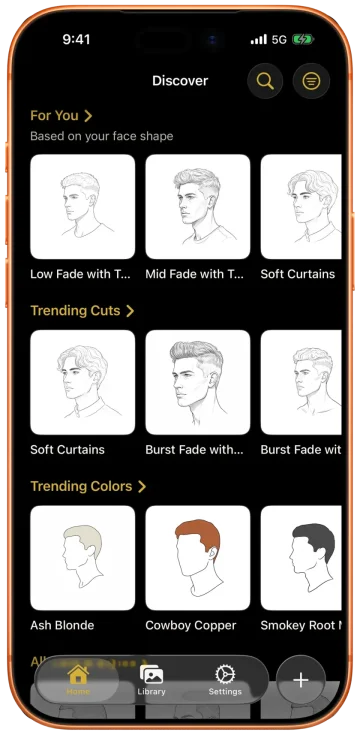
Pick three cuts that suit both the shape and the hair — not just "short" but a name a stylist would recognize, like a textured crop or a collarbone lob. Our guide to hairstyles for each face shape is a good place to find the names.
Preview Them in One Gemini Grid
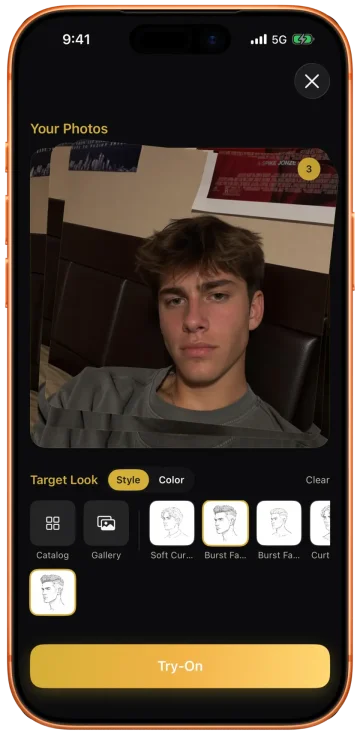
Upload the same selfie to Gemini and ask for a grid of your three cuts with your face kept identical in every panel. Comparing them side by side on one version of you is far more honest than three separate edits.
Check the Face Before the Hair
Put each result next to your original. If the jaw got sharper, the hairline moved, or your curls went straight, the preview is of someone else — regenerate before you judge the cut.
Walk In With the Name, Not the Picture
Take the winning cut's name, your face shape, and a note about your hair type to the appointment. A barber can execute "a textured crop with a low taper, I have fine wavy hair" far more reliably than a screenshot of a redrawn face.
The free route has one weak link, and it's step three: the preview is the part a chatbot draws, not measures. When the decision gets expensive — a big chop, a first fade, growing out for a year — that's the step worth upgrading, to a try-on that keeps your actual face and shows the cut from the side and three-quarter view as well.
Spot a Free-Trial Trap Before It Bills You
A free trial is a perfectly good deal if you treat it like one. Five habits keep it that way:
- Read the trial screen in full. It should state the price after the trial and the date billing starts. If you can't find both, close it.
- Check whether it's weekly. Some apps bill by the week, which looks small on the screen and adds up fast.
- Set a reminder for the day before it ends. Not the day of — billing can happen early in the day.
- Cancel in Settings, not by deleting. On iPhone, open Settings, tap your name, then Subscriptions. Deleting the app doesn't cancel anything.
- Prefer apps that say what's free. An app that tells you up front which parts cost money is usually being straight with you about the rest.
Questions People Ask
Is there a free app for hairstyles?
Yes, though what's free differs by app. Gemini and ChatGPT will change your hairstyle in a photo for free, as many times as you like, but they don't know what suits you and they redraw your face. Dedicated apps are mostly free to download with a subscription for the full toolset. Glancely is free to download on iOS, and your face shape and much of the read around it come free with it.
Is there a free app to try hairstyles on my face?
The closest to fully free is a chatbot with image editing: upload a selfie to Gemini or ChatGPT and ask for a named cut. It's free and unlimited, but it regenerates the whole photo, so your face can drift. Dedicated try-on apps keep your face intact and render more realistic results, and most of them, Glancely included, are free to download with a subscription for the full toolset.
What is the best free app for hairstyles on my face?
It depends on what you need free. To find out which hairstyles suit your face, Glancely: your face shape and much of the read around it come free with the download on iOS. For unlimited free experiments, Gemini. For live hair color on your camera, YouCam Makeup. The strongest free setup combines the first two: get your face shape from Glancely, then preview the cuts it points to with a Gemini prompt.
Can I find a hairstyle for my face for free?
Yes. Start with your face shape, which Glancely gives you free with the download on iOS: one selfie returns your primary shape and any secondary blend, measured from 76 facial landmarks. Match that shape, and your hair's texture, to two or three named cuts, then preview them on your photo with a free Gemini prompt before you book.
Is Glancely free?
Glancely is free to download on iOS. Your face shape comes free, along with much of the read around it. Glancely Premium opens up the rest. The App Store listing shows the current subscription options before you commit to anything.
How do I avoid getting charged by a free hairstyle app?
Read the screen before you tap 'Start free trial': it should name the price and the date billing starts. Set a reminder a day before the trial ends. To cancel on iPhone, open Settings, tap your name, then Subscriptions, and cancel there — deleting the app doesn't cancel a subscription. Apps that state their pricing plainly up front are the ones worth trusting.
Bottom Line
There is a free app for hairstyles; there just isn't one free app for the whole decision. Chatbots give you unlimited free previews that don't know your face. Glancely gives you the part they're missing — your face shape and much of the read around it — free with the download. Put the two together and you can get from "what suits me?" to a named cut for your barber without paying anything.
And when the cut is a big one, spend where it counts: on seeing it on your real face, from every angle, before the clippers come out. That's what Glancely is built for, and it's free to download on iOS.
Start With the Free Part
One selfie. Your face shape, measured from 76 landmarks and explained, then your hair, your undertone, and the cuts that suit you, on you. Free to download on iOS.
Download Glancely