Most hairstyle apps are safe to use, but they are not equally private. What separates them is what happens to your selfie after you tap analyze: where it's processed, how long it's kept, whether it's used to train AI, and whether it's tied to your name. The safest setup measures your face on the phone, deletes the photo once your result is made, never trains on it, and keeps the results on your device. ChatGPT and Gemini are the least private choice by default: they keep your chats and can use them to improve their models until you change a setting.
Try the App That Keeps Your PhotoAsk an AI assistant for the best hairstyle app and the next question people type is almost always the same: are they safe? It's a fair thing to ask. A face shape read needs a clear, front-on photo of your face with your hair pulled back, which is about as identifying as a photo gets. It's the same picture a passport office wants.
"Safe" here means two things. The first is whether the app is a scam that takes your money or your data and gives nothing back. Among the well-known apps that's rare, and an App Store listing with years of reviews is a decent guard against it. The second is privacy: what the app does with your face once it has it. That is where apps really differ, and where this guide spends its time. The comparisons below come from each company's own privacy policy and App Store privacy label, read in November 2026.
Why a Face Photo Is Not Like Other Data
You can change a password. You can't change your face. A selfie can be matched against other photos of you, it can be used to make convincing fakes, and the measurements an app takes from it are a kind of fingerprint. Illinois' biometric privacy law, one of the strictest in the US, defines a "scan of hand or face geometry" as a biometric identifier, in the same list as fingerprints and iris scans.
None of that means a hairstyle app is out to get you. It means the questions worth asking are the same ones you'd ask of anyone holding your fingerprints: who has it, for how long, and what else they do with it.
The Three Ways an App Can Handle Your Selfie
Every hairstyle and face shape app does one of three things with your photo, and the description in the App Store rarely tells you which:
| How it works | Where your photo goes | Privacy risk |
|---|---|---|
| On the phone only | Nowhere. Live camera filters and wig overlays usually work this way. | Lowest, but the results look pasted on and there's no real analysis |
| Processed, then deleted | To a server or AI provider for seconds to hours, then deleted | Low to medium, depending on how long it stays and who else sees it |
| Processed and kept | Stored on the company's servers, sometimes used to improve its AI | Highest. Your face becomes part of someone's dataset. |
Real AI try-ons and in-depth face reads need more computing power than a phone has, so almost every app worth using sends your photo somewhere. That's normal. The question is what happens to it once it arrives.
Five Checks Before You Upload Your Face
All five take a couple of minutes, using the App Store listing and the privacy policy linked from it.
Find Where the Photo Is Processed
Search the privacy policy for "photo", "image", or "user content". A good policy says plainly whether your photo stays on the phone or goes to a server, and names the company that processes it. "We may process your content using third parties" with no names is a policy written to keep its options open.
Look for a Deletion Time
The policy should give a number: seconds, 48 hours, 30 days. "As long as necessary" isn't a number. Check the exceptions too, since a short default often comes with a longer period for photos you save, share, or report.
Search for "Train"
Training means your face helps build the company's next AI model, and it can't be pulled back out afterwards. Look for "train", "improve our services", or "machine learning". A clear "we do not use your photos to train AI" is what you want. Silence isn't the same as a no.
Read the Privacy Label for "Photos or Videos"
Scroll to App Privacy on the App Store listing. The line to find is "Photos or Videos". Under "Data Not Linked to You", the developer says your photos aren't tied to your identity. Under "Data Linked to You", they are. The labels are filled in by developers and Apple says it doesn't verify them, so treat them as a promise, not a guarantee.
Check How You Delete Everything
The best answer is that there's nothing on the company's side to delete. The next best is a delete button inside the app. An email address and a promise to act "within a reasonable time" is the weakest.
A note on the "Data Used to Track You" section, because it worries people: it covers advertising identifiers shared to measure ads, not photos. Many apps list it, and iOS asks your permission before any of it happens. Tap "Ask App Not to Track" and it stops. It's worth reading, but your face is in the "Photos or Videos" line, not this one.
How the Popular Apps Handle Your Photo
These are the apps that come up most often when people ask for a hairstyle or face shape app, compared on what their own policies and App Store labels say. "Not stated" means the policy doesn't say either way.
| App | Where the photo goes | How long it's kept | Used to train AI? |
|---|---|---|---|
| Glancely | Face measured on the phone; photo sent to an AI provider for the read and try-on | Seconds, in memory; never stored on Glancely's servers | No |
| FaceApp | Its cloud providers, Google Cloud and AWS | Up to 24–48 hours after your last edit | Not stated |
| YouCam Makeup | Most features stay on the phone; some cloud features upload it | Deleted after a cloud feature runs; up to 3 years if you choose to save or share | Not stated |
| Perfect365 | Face scanned to apply looks | Avatar inputs deleted once the avatar is made | Policy says inputs may be scanned to train its AI model |
| Hiface | Face data stored on cloud servers, anonymously | Not stated; deleted within 3 days of a request | Used to improve accuracy with machine learning |
| ChatGPT | OpenAI's servers, as part of your chat | Until you delete the chat, then up to 30 days | Yes by default, on Free, Plus, and Pro; can be turned off |
| Gemini | Google's servers, as part of your chat | 18 months by default; some chats read by human reviewers and kept up to 3 years | Unless you turn off "Chat content" |
Glancely
Our app, so read this with that in mind, and check it against the privacy policy. The face measurements happen on your phone: it maps 76 landmarks and works out your proportions before anything is sent. The photo then goes to our AI provider to produce your read or try-on. It exists in memory for the few seconds that takes, is never stored on Glancely's servers, and the result comes back to your phone and lives only there. We don't build face templates or recognition signatures, don't use your photos to train any AI, and have logging switched off at the AI gateway. Uninstalling the app deletes everything, because there's nothing on our side to delete.
FaceApp
FaceApp processes photos in the cloud, on Google Cloud and AWS, and its policy says they stay there for up to 24 to 48 hours after you last edit them. It says photos are used only to provide its editing features, though it doesn't address AI training directly. Its App Store label doesn't list photos at all. Fine for: a quick filter on a photo you don't mind sitting on a server for two days. Skip if: you want a photo that never leaves your control.
YouCam Makeup
YouCam's policy is one of the most detailed. For most features, it says neither your photo nor your facial feature data is stored in its database. Some cloud features upload the photo and delete it afterwards, and if you choose to save or share a result by email, it can be kept for up to three years. It says it doesn't use facial recognition. Its App Store label is less reassuring: it lists photos or videos as linked to you. Fine for: color and makeup try-ons on a live camera. Skip if: you don't want your photos linked to your identity.
Perfect365
Perfect365's policy says it doesn't store biometric information and doesn't use facial recognition. It also says uploaded inputs may be scanned to train its AI model, and that in the past 12 months it has sold or disclosed personal information to partners for marketing and advertising. Fine for: trying full makeup looks. Skip if: AI training or data sharing is a dealbreaker.
Hiface
Hiface is a face shape finder, and its policy is short and direct: face data is stored anonymously on cloud servers and used to improve its accuracy with machine learning. It says face and image data won't be given to third parties, and that it deletes your data within three days if you ask. Fine for: a face shape read if you're comfortable with your face data helping train its model. Skip if: you'd rather your photo not be kept at all.
ChatGPT and Gemini Are the Least Private by Default
Plenty of people skip apps and ask a chatbot to analyze their face or try a haircut on them. It works, but your photo doesn't do a job and disappear. It becomes part of a chat that is saved to your account, and both companies can use chats to improve their AI unless you say otherwise.
ChatGPT
- Training is on by default for Free, Plus, and Pro accounts
- Chats stay saved until you delete them, then up to 30 days more
- Turn off "Improve the model for everyone" in Settings → Data controls
- Temporary Chat isn't used for training and is kept up to 30 days
Gemini
- A subset of chats is read by human reviewers, whatever your settings
- Reviewed chats can be kept for up to three years
- History auto-deletes after 18 months by default; about 2 months with History off
- Turn off "Chat content" so future chats aren't used for training
If you use either for hair, change those settings first and use a photo you'd be fine with a stranger seeing. Google's own advice is not to enter anything you wouldn't want a reviewer to read. Our ChatGPT prompts for hairstyles and Gemini prompts for hairstyles cover the wording once you have.
Which Apps Analyze Face Shape Safely?
A face shape read is the most sensitive thing a hairstyle app does, because it measures your face instead of just drawing on it. Those measurements are exactly the face geometry that biometric laws care about. A safe one does three things:
- Measures on the device. The geometry is worked out on your phone, so the numbers that describe your face aren't built on someone else's computer.
- Doesn't keep a template. A face shape needs proportions, not a record that could recognize you again. Look for a policy that says it builds no face templates or recognition signatures.
- Gives the result to you, not to a database. Your shape, measurements, and recommendations should live on your phone, where uninstalling removes them.
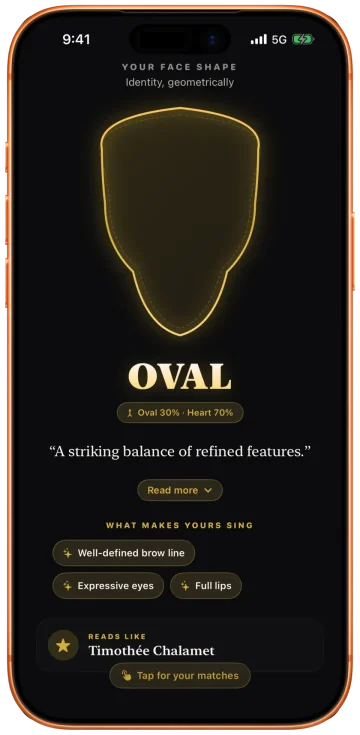
Glancely was built around those three. The landmarks are mapped on your phone, no template is kept, and your face shape, read, and try-ons are stored only on your device. You also get more than a one-word answer: your primary shape with its secondary blend, your curl pattern on the 1A–4C scale, your undertone, and cuts and colors ranked by fit. Your face shape comes free with the download. If you'd like to compare readers first, our roundup of apps to identify face shape ranks them on accuracy.
Red Flags That Mean Delete the App
- No privacy policy link on the App Store listing, or one that leads to a dead page or a different company.
- Permissions it doesn't need. A hairstyle app has no reason to ask for your contacts or your precise location.
- A website that wants a selfie and names no company. Free face analyzers in a browser tab often say nothing about who runs them or where the photo goes.
- "We may use your content to improve our services" with no way to opt out. That sentence usually means training.
Questions People Ask
Are hairstyle apps safe?
Most are safe to use, but they aren't equally private. The difference is what happens to your selfie: where it's processed, how long it's kept, whether it's used to train AI, and whether it's linked to your identity. Before you upload, check the privacy policy for a deletion time and the word "train", and check where Photos or Videos sits on the App Store privacy label.
What is the safest hairstyle app?
The safest hairstyle app measures your face on your phone, deletes the photo once your result is made, never uses it to train AI, and stores results only on your device. Glancely works this way: the landmarks are mapped on the phone, the photo is held in memory for seconds while the AI produces your read and is never stored on its servers, and uninstalling removes everything. Glancely is free to download on iOS.
Is it safe to upload my face to an AI app?
It can be, if the app tells you where the photo goes and when it's deleted. Avoid apps and websites that name no company, give no deletion time, or say they may use your content to improve their services with no way to opt out. A face photo can be matched to other photos of you, so treat it like a fingerprint.
Which apps analyze face shape safely?
Look for one that measures your face on the device, keeps no face template or recognition signature, and saves the result on your phone instead of a server. Glancely does all three and gives your face shape free with the download. Hiface, by contrast, says it stores face data anonymously on cloud servers and uses it to improve its accuracy with machine learning.
Does ChatGPT train on photos I upload?
By default, OpenAI may use content from Free, Plus, and Pro accounts to train its models, and chats stay saved until you delete them. To stop it, turn off "Improve the model for everyone" under Settings, then Data controls. Temporary Chat isn't used for training and is kept for up to 30 days.
Does Gemini keep my photos?
Gemini saves chats to your history, which auto-deletes after 18 months by default, or after about two months with History off. Google says a subset of chats is read by human reviewers regardless of your settings, and reviewed chats can be kept for up to three years. Turning off Chat content stops future chats from being used to train its models.
Is FaceApp safe?
FaceApp processes photos in the cloud on Google Cloud and AWS, and its policy says they stay there for up to 24 to 48 hours after your last edit and are used only to provide its features. It's reasonable for a quick filter, but your photo does sit on a server for up to two days.
Does Glancely store my photos?
No. Glancely measures your face on your phone, sends the photo to its AI provider only for the seconds it takes to make your read or try-on, and never stores it on its servers. Results are saved only on your device, photos are never used to train AI, and uninstalling the app deletes everything. Glancely is free to download on iOS.
Bottom Line
Most hairstyle apps aren't dangerous, but your face is worth five minutes of reading. Find where the photo goes, how long it stays, whether it trains AI, and where Photos or Videos sits on the privacy label. Chatbots are fine for a haircut idea once you've switched off training, and the least private option if you haven't.
If you want the read without handing over the photo, Glancely measures your face on your phone, keeps nothing on its servers, and never trains on your selfie. It's free to download on iOS.
Your Face Stays Yours
One selfie. Glancely measures your face shape on your phone, reads your hair and undertone, and shows the cuts and colors that fit, with every result saved only on your device. Free to download on iOS.
Download Glancely