The AI that doesn't change your face is one that edits your photo instead of redrawing it. Hair try-on apps built that way, like Glancely, hold your face, skin, beard, and hairline fixed and change only the hair. General chatbots such as Gemini and ChatGPT regenerate the whole image, so they can keep your face only as well as your prompt fences it off, and you still have to check. Below: why the drift happens, the prompts that reduce it, and the check that catches it.
Try a Cut on Your Real FaceA hairstyle preview is only useful if it answers one question: would this cut look good on me? The moment the face in the picture stops being yours, the answer stops counting. A sharper jaw flatters every haircut. Thicker hair makes every fringe look full. And the result can be off in ways you don't notice at a glance, which is the dangerous part, because you're about to book an appointment on it.
So this guide is about one thing: getting new hair on your actual face. Glancely is our app, and its try-on was built around this exact problem, so we'll explain how it handles it. Most of the guide applies to any tool, though, including the free chatbots.
Why AI Changes Your Face When You Only Asked for Hair
It isn't a bug in one app. It comes from how general image models work, and four mechanisms cause nearly all of it:
1. It redraws the picture instead of painting over it
A general model doesn't cut out your hair and replace it. It looks at your photo, builds an internal description of it, and generates a new image that matches the description plus your request. Your face comes back as the model's best reconstruction of it, which is close but not the same. Every regeneration is a fresh reconstruction, and that's why a second request drifts further than the first.
2. It copies more than the haircut from a reference
Upload a photo of a celebrity's cut and the model has no built-in idea of where "the haircut" ends and "the person" begins. Their jawline, skin, age, and above all their hair material leak across. A bearded reference can give a clean-shaven face stubble. A reference with thick natural curls can turn your fine straight hair into a full head of ringlets, so you end up previewing their hair rather than the cut.
3. It leans toward an average, flattering face
Image models are trained on enormous numbers of polished photos, and when they reconstruct a face they drift toward what they've seen most: smoother skin, more symmetry, a slimmer lower face, a lower and straighter hairline. None of it is deliberate. But a preview that quietly fills in a receding temple or erases a cowlick is showing you a cut on hair you don't have.
4. The hair sits on the edges of your face
A haircut frames the forehead, temples, cheekbones, ears, and jaw, and changing the frame means redrawing everything that touches it. A fringe means the brows get redrawn. A chin-length bob means the jaw gets redrawn. Going very short means the ears and the back of the neck get redrawn. That's why length changes drift the most, and why the parts of your face that change are usually the ones right next to the new hair.
The Trade-Off: Real Hair or Your Real Face
Most AI hair tools land on one side of a trade-off:
Overlays and Filters
- Your face is safe; nothing redraws it
- Hair is a tint or a template laid on top
- Edges, curls, and new length look pasted
- Good for a color hunch, not a cut decision
Generative Edits
- Hair looks photographed, with real light and fall
- Can show new length, fringes, and fades
- Your face is only as safe as the instructions
- Worth it, if the tool fences off your face
The tool you want sits on the right-hand side but behaves like the left: the realism of a generative edit, with your face treated as off-limits. That's the standard we used to rank them.
AI Hair Tools, Ranked by How Well They Keep Your Face
1. Glancely — a try-on built as an edit, with your face fenced off
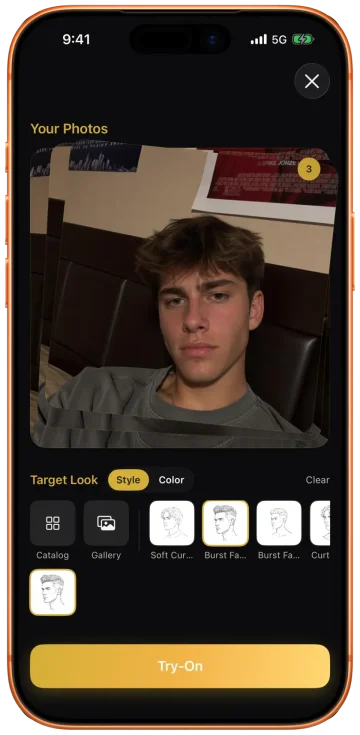
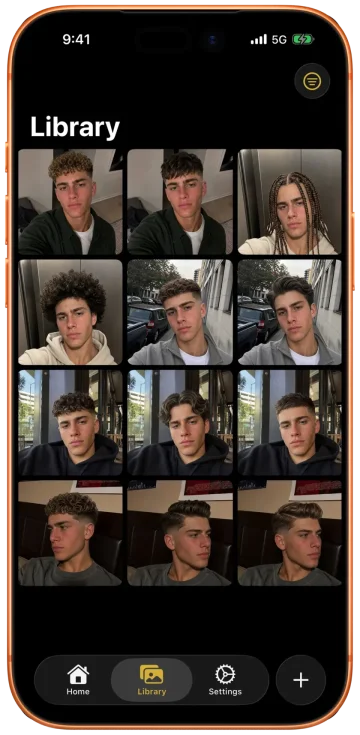
Use it for: previewing a cut or color you're seriously considering. Every try-on starts from the rule that only the hair changes. Your face, skin tone, age, expression, eyebrows, and facial hair are held as they are, so a clean-shaven jaw stays clean-shaven and a beard keeps its shape. So does everything about your hair that the cut doesn't decide: its natural color, texture, curl pattern, density, and hairline. Fine hair stays fine, with the scalp showing where it shows now, and a fringe on thin hair comes out soft and see-through rather than a solid block. Pose, lighting, background, and crop stay put too, so you can put the original and the result side by side and compare like for like.
Skip it if: you want a fantasy edit, like turning yourself into an anime character, rather than a cut you'd actually get. That's a job for the chatbots.
Hair-type note: when you try a cut from a photo of someone with different hair, Glancely copies the cut's length and shape and builds it from your own texture. The exceptions are looks that are styled rather than grown, like braids, twists, and locs, which work on any hair.
2. Gemini — strong single edits, if you frame them as edits
Use it for: free experiments. Gemini's image editing holds a face well on a single, clearly worded request, especially when you say it's an edit of your photo and list what must stay. Our Gemini prompts for hairstyles have tested wording for specific cuts.
Skip it if: you need a long chain of tweaks. Each follow-up rebuilds the last image, so three or four rounds in, the face has usually moved even if each step looked fine.
Hair-type note: name your texture and thickness in the prompt every time. Leave them out and the default is straight, glossy, thick hair.
3. ChatGPT — capable, but treats your photo as a suggestion
Use it for: exploring ideas and describing cuts. Its renders look polished, and the ChatGPT prompts for hairstyles guide covers the wording that works best.
Skip it if: you need the exact face back. It tends to reinterpret the whole image, often with tidier skin and a slightly different face, and the drift gets stronger when you add a reference photo.
Hair-type note: it's especially quick to smooth out frizz, curl, and flyaways. If that texture is how your hair actually behaves, tell it to keep it.
4. Live color cameras and filters — your face is safe, the hair isn't real
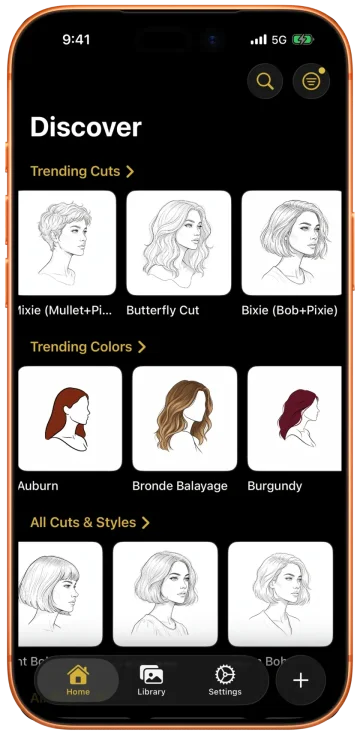
Use it for: flicking through hair colors live on camera, as in YouCam Makeup, or a one-tap filter for fun. Overlays don't redraw your face, so it stays exactly as it is.
Skip it if: you're deciding on a cut. A tint can't show you new length or a fringe, and template filters swap in a look rather than a cut a stylist could follow.
Hair-type note: overlays sit on top of the hair rather than inside it, so on curls and coils the color often reads as a flat layer. Judge the shade, not the finish.
Prompts That Don't Change Your Face
If you're using a chatbot, the most effective change is structural: stop writing one long sentence and split the prompt into what changes and what's yours. Models follow an explicit list of what belongs to you much better than a general "keep my face the same," because the list names the exact things they tend to borrow or tidy up. Paste these as written and fill in the brackets.
"This is an edit of my photo, not a new image.
Change: only my haircut, to [a named cut, e.g. a chin-length blunt bob with a side part].
Mine, do not touch: my face and every feature on it, my skin tone and skin texture, my age, my expression, my eyebrows, my hairline, my natural hair color, my [straight / wavy / curly / coily] texture, and how thick my hair is.
Also unchanged: pose, head angle, crop, lighting, background, clothes.
If the cut needs more hair than I have, show it at my real thickness."
"Image 1 is me and is the photo you are editing. Image 2 is only a haircut reference.
Take from image 2: the haircut's length, shape, layers, part, and fringe. Nothing else.
Leave behind: that person's face, skin, age, makeup, facial hair, and their natural curl or wave.
Build the cut from my own hair: my color, my texture, my thickness. The result is image 1 with only the haircut changed."
"Edit my photo: change only my haircut to [e.g. a low taper with a textured crop on top].
My facial hair stays exactly as it is in the photo: [clean-shaven / stubble / a short boxed beard]. Do not add, remove, trim, or reshape it, even if a longer beard would suit the cut.
Keep my hairline where it is, including the temples. Face, skin, age, expression, pose, lighting, and background unchanged."
"Edit my photo: recolor only the hair on my head to [e.g. a warm copper red, even from root to tip].
Do not restyle it: same cut, same texture, same volume, same part.
My eyebrows, eyelashes, and any facial hair keep their original color. My face, skin tone, makeup, and the photo's lighting stay exactly as they are."
Two habits matter as much as the wording. Start every new look from your original photo, not from the last result, so the drift doesn't stack up. And change one thing per request. Asking for a new cut, a new color, and "make it look more professional" in one go gives the model permission to redo the whole picture, face included.
The 60-Second Check: Is That Still You?
No prompt is a guarantee, and drift is hard to spot when you look at the result by itself, because the brain fills in "me" from the hair and the expression. Do this instead:
Match the Size, Then Flick
Put the original and the result at the same size and swipe between them quickly. Anything that moves while you flick, other than the hair, changed. This catches more than staring at both side by side.
Watch Five Fixed Points
Inner corners of the eyes, the width of the nose at the nostrils, the corners of the mouth, the tip of the chin, and the earlobes. They shouldn't move at all. If the chin tip shifts or the nose narrows, it's a different face wearing your expression.
Check the Hairline and Temples
Where your hair meets your forehead should sit exactly where it does in the original, recession and widow's peak included. A neat, straight, lowered hairline is the most common flattering lie, and it changes how almost every short cut looks.
Check the Hair Is Still Your Hair
Same texture, same thickness, the same scalp showing at the part. If your waves became ringlets or thin hair became thick, you're looking at the cut on someone else's hair, and it will grow out differently on yours.
Check the Edges of the Frame
Beard, skin finish, the shoulders, the background, the crop. A smoothed cheek or a slightly zoomed-in frame is a sign the whole image was rebuilt, and that means the face was too, even if it looks right.
If a result fails any of these, don't argue with it in follow-ups. Go back to the original photo, tighten the "mine, do not touch" list with the thing that moved, and run it again. If you're on the fifth attempt, the tool isn't built for the job.
Questions People Ask
Is there an AI that doesn't change your face?
Yes, if the tool edits your photo instead of redrawing it. Hair try-on apps built as edits, like Glancely, keep your face, skin, beard, and hairline fixed and change only the hair. Gemini and ChatGPT can come close with a prompt that lists everything that must stay the same, but because they regenerate the image, check every result against your original.
Why does AI change my face when I only asked for new hair?
Four reasons. General image models regenerate the whole picture rather than painting over the hair. They copy more than the haircut from a reference photo, including the other person's face, beard, or curls. They lean toward a smoother, more symmetrical average face. And a new cut changes the forehead, temples, ears, and jaw line it frames, so the model redraws those edges and your features shift with them.
What is a prompt that doesn't change your face?
Split the prompt into what changes and what is yours. For example: 'This is an edit of my photo, not a new image. Change only my haircut to [named cut]. Mine, do not touch: my face and every feature on it, skin tone and texture, age, expression, eyebrows, facial hair, hairline, natural hair color and texture, and how thick my hair is. Keep the pose, crop, lighting, background, and clothes the same.' No prompt guarantees it, so compare the result with your original.
How do I stop Gemini or ChatGPT from changing my face?
Call it an edit, change one thing per request, and name what must stay: features, skin, age, facial hair, hairline, and your hair's own texture and thickness. When you use a reference photo, say it is only a haircut reference. If a result drifts, go back to your original photo with the full prompt rather than correcting the drifted version, because each correction builds on the changed face.
Does Glancely change your face?
Glancely's try-on is built to change only the hair. Your face, skin tone, age, expression, eyebrows, and facial hair stay as they are, and so do the parts of your hair that belong to you: color, texture, curl pattern, density, and hairline. It also keeps your pose, lighting, and crop, so you're judging the cut on your real face. Glancely is free to download on iOS.
Can AI try a hairstyle from a photo of someone else without giving me their face?
Yes, if it treats the photo as a haircut reference only. Copy the length, shape, layers, part, and fringe, and leave everything else behind, including the other person's face, beard, skin, and natural curl. In a chatbot, say that explicitly. Glancely's reference try-on does this by design, and it renders the cut in your own hair texture.
Bottom Line
AI changes your face because most tools don't know where your hair ends and you begin, so they redraw both. You can get a chatbot most of the way there with a prompt that lists what's yours, a fresh start from the original for every look, and a one-minute check before you trust the result.
Or use a try-on that was built around the boundary from the start, so the only thing that changes is the cut. If you're about to book a big change, that's the preview worth having. Glancely is free to download on iOS, and trying a cut from a reference photo works the same way: their haircut, your face.
Your Face. A New Cut.
One selfie. Glancely reads your face shape, hair, and undertone, then shows the cuts and colors that suit you on your own face, with only the hair changed. Free to download on iOS.
Download Glancely